
The Draytek Vigor 130 configuration menu can be accessed from http://192.168.1.1
You will need to have a computer/laptop on the same network to access the modem i.e example 192.168.1.2/24
The default username and password is admin and admin.
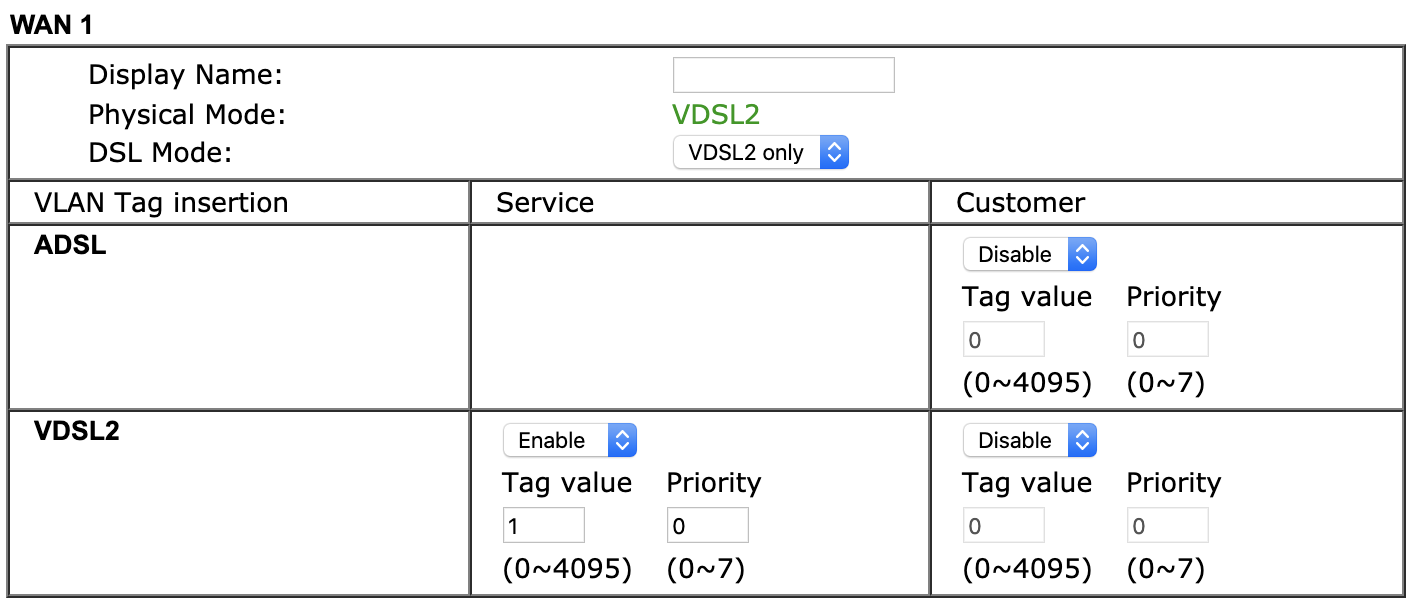
When logged on goto Internet Access > General Setup
Under VDSL2 change the “Tag value” to 1
Under Internet Access >> PPPoE / PPPoA menu
Set PPPoE/PPPoA Client to Disable
Under Internet Access >> MPoA / Static or dynamic IP
Set MPoA (RFC1483/2684) to Enable
Encapsulation to 1483 Bridged IP LLC
VPI : 8
VCI : 35
Modulation : Multimode
Bridge Mode : tick “Enable Bridge Mode” and then hit Ok.